# Technical Specification: ZQK Interactive Object Inspector Console & Policy Studio
**Document ID:** `SPEC-OBJECT-INSPECTOR-CONSOLE-001`
**Status:** Approved Architectural Specification
---
## 1. Executive Summary & Vision
The **ZQK Knowledge Kernel** models all system artifacts (requirements, backlog items, priority plans, test cases, criteria, policies, prompts, personas, telemetry records) as discrete, typed objects governed by schema contracts, CAS storage, and lifecycle state machines.
Currently, human developers and autonomous agents inspect objects using CLI listing and retrieval commands:
- **Entity Listing**: `zqk object list [kind] --fields id:30,title:40,status:12 --filter ... --sort-by ...`
- **Entity Retrieval**: `zqk object get [kind] [id] -f yaml`
While powerful and scriptable, these existing surfaces impose high cognitive friction:
- **Human Friction**: Memorizing column widths, quoting filter arguments, and parsing massive raw YAML dumps cluttered with transport boilerplate (`metadata`, `etag`, `storage_profile`, `status_history`).
- **Agent Friction**: Token waste ingesting noisy unstructured YAML payloads when only essential attributes, relations, and current lifecycle state are needed.
- **Governance Friction**: Writing and validating policy constraints and CPCP boundary rules in text files without live dry-run validation against repository state.
The **ZQK Object Inspector** (`zqk object inspect` / `zqk ui --tab inspector`) delivers:
1. **Terminal Design System (TDS) Console**: Full-screen console for browsing any kernel kind with responsive keyboard navigation, instant status filtering, column cycling, and master-detail splits.
2. **Modular Property Modules**: Canonical rendering components for common complex structures (Lineage & Traceability Radar, CAS Storage Hygiene, Ontology Linkages, Role Entitlements).
3. **Role & Account Gated Action Palette**: Interactive state transitions, work claiming, and editor hooks gated by the active `SecurityContext`.
4. **Live Policy Rule Studio**: Interactive visual builder for validation DSL expressions with field auto-completion from `FieldRegistry` and real-time dry-run impact evaluation across active kernel objects.
5. **Dual Machine/Human Architecture**: Full-color ANSI TUI for human pair programming, paired with reduced semantic JSON/YAML projections (`--format json`) for autonomous agents.
---
## 2. Architecture & Domain Grammar
### 2.1 CLI Taxonomy & Command DNA
Conforming to `docs/architecture/CLI_COMMAND_TAXONOMY_STANDARDS.md`:
```bash
# Standalone CLI Entry Point
zqk object inspect [kind] [id] [flags]
# Aliases
zqk inspect [kind] [id]
zqk object browser [kind]
```
#### Command Flags & Invariants
| Flag | Short | Type | Default | Description |
| :--- | :--- | :--- | :--- | :--- |
| `--kind` | `-k` | `string` | `""` | Initial object kind to browse (e.g. `backlog_item`, `policy`). |
| `--id` | — | `string` | `""` | Jump directly into modal inspection for a specific object ID. |
| `--filter` | — | `stringArray` | `[]` | Filter expressions (`status=active`, `priority_tier=P0`). |
| `--sort-by` | — | `string` | `updated_at` | Sort field name. |
| `--sort-asc` | — | `bool` | `false` | Sort ascending (default is descending / newest first). |
| `--policy-studio` | — | `bool` | `false` | Launch directly into the Policy Rule Studio. |
| `--format` | `-f` | `string` | `table` | Output format: `table` (interactive TUI), `json`, `yaml`, `semantic-link`. |
---
## 3. Terminal User Interface (TUI) Layout & Interaction Model
### 3.1 Master-Detail Layout Specification
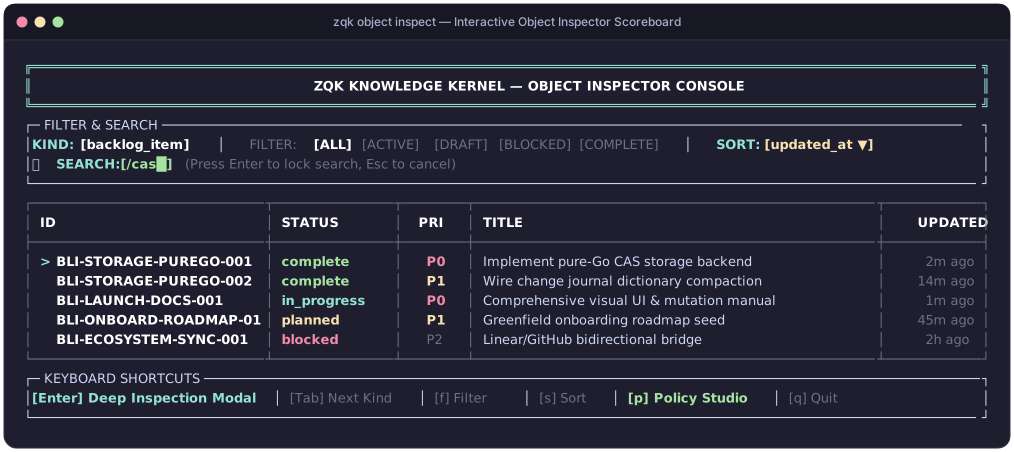
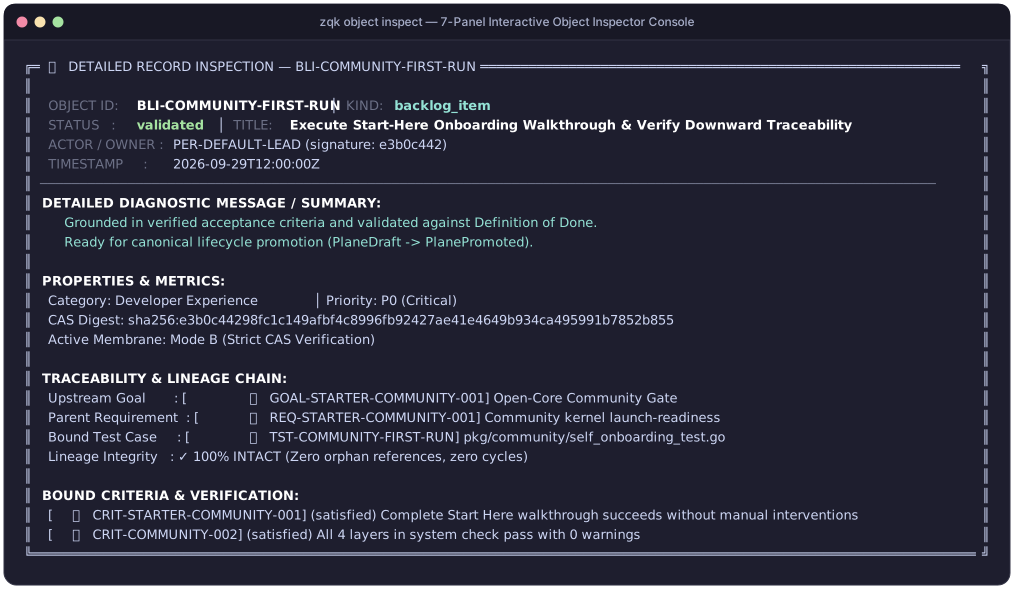
The Object Inspector operates in two primary modes: the **Main Scoreboard Table** for browsing entities of a selected kind, and the **Deep Inspection Modal** for drilling down into an entity's internal attributes, lineage, CAS provenance, and action palette.
#### Visual Terminal Screenshot: Object Inspector Scoreboard
#### Datapoint Breakdown & Operator Guidance
| Datapoint / Component | Visual Format | Semantic Meaning | Why It Is Useful & Operational Purpose |
| :--- | :--- | :--- | :--- |
| **Header Banner** | Double-line cyan box (`╔...╗`) | Active console context and application title | Confirms console subsystem identity and terminal width bounds. |
| **Kind Selector** | Cyan tag (`[backlog_item]`) | Active object kind being browsed | Indicates which schema registry definition governs displayed columns and filters. Press Tab to cycle. |
| **Filter Pills** | Pill list (`[ALL]`, `[ACTIVE]`, `[DRAFT]`, `[BLOCKED]`, `[COMPLETE]`) | Active lifecycle status filter | Prunes clutter so operators and agents focus on actionable workstreams. Press f to cycle. |
| **Sort Criterion** | Yellow badge (`[updated_at ▼]`) | Ordering property and sort direction | Identifies temporal or priority ranking. Press s to toggle ascending/descending. |
| **Inline Search** | Green prompt (`[/cas█]`) | Interactive substring and regex filter query | Filters rows in real-time across ID, title, and body attributes. |
| **Cursor Indicator** | Bright cyan arrow (`>`) | Currently focused object row | Marks the item that will be targeted upon pressing Enter for deep inspection. |
| **Table Scoreboard** | Standardized TDS Table (`┌...┐`) | Multi-column entity overview | Displays ID, lifecycle status, priority tier, title, and relative age with guaranteed column width bounds. |
| **Status Badge** | Color-coded status pill (`complete`, `in_progress`, `planned`, `blocked`) | Lifecycle state machine position | Visual indication of workflow progression. |
| **Priority Tier** | Color pill (`P0`, `P1`, `P2`) | Urgency and triage classification | Highlights mission-critical blockers (`P0`) vs standard backlog tasks. |
| **Action Footer** | Keycap menu (`[Enter] Deep Inspection`, `[p] Policy Studio`, `[q] Quit`) | Available keyboard accelerator bindings | Provides single-keypress hotkeys for fast operator navigation without leaving the terminal. |
#### Visual Terminal Screenshot: Deep Inspection Modal (Enter)
#### Datapoint Breakdown & Operator Guidance
| Datapoint / Component | Visual Format | Semantic Meaning | Why It Is Useful & Operational Purpose |
| :--- | :--- | :--- | :--- |
| **Entity Title & Status** | Top status banner with state icon | Selected object ID and current lifecycle state | Immediate identification of inspected node and its operational readiness. |
| **Lineage Radar** | Upward/downward tree nodes | Complete graph chain (`Goal ➔ Req ➔ BLI ➔ Test ➔ Criteria`) | Guarantees unbroken traceability and Definition of Done compliance before promotion. |
| **Integrity Badge** | Green check (`✓ 100% INTACT`) | Graph connectivity and constraint health | Confirms that the entity has no orphaned references or cyclic dependencies. |
| **CAS Provenance** | Hex SHA-256 hash & byte metrics | Content-addressed storage fingerprint and plane (`authoritative` vs `draft`) | Cryptographic audit trail verifying immutable CAS storage state. |
| **Action Palette** | Interactive hotkey list (`[p] Promote`, `[c] Claim`, `[e] Edit`) | Valid next-state lifecycle mutations | Executes atomic state transitions directly from keyboard without manual CLI typing. |
### 3.2 Navigation & Keyboard Shortcuts
| Key Binding | Target Action | Behavior & Operational Semantics |
| :--- | :--- | :--- |
| Tab / Shift+Tab | Cycle Schema Kind | Cycles through registered kernel kinds (`backlog_item` ➔ `requirement` ➔ `policy` ➔ `test_case`...). |
| j / k or ↓ / ↑ | Move Cursor | Moves the active row selection cursor (`▶`) up or down through the scoreboard list. |
| f | Filter by Status | Toggles status filter selector (`ALL`, `ACTIVE`, `DRAFT`, `BLOCKED`, `COMPLETE`). |
| / | Interactive Search | Opens real-time substring and regex search prompt across entity attributes. |
| s | Cycle Sort Field | Cycles ordering criteria (`updated_at` ➔ `created_at` ➔ `id` ➔ `priority`). |
| Enter | Deep Inspection | Opens the modal inspector and role-gated action palette for the selected object. |
| e | External Editor | Opens the object definition in `$EDITOR` for direct YAML editing. |
| q / Esc | Return / Exit | Dismisses active modal dialog or exits the console. |
---
## 4. Modular Display Modules
The Inspector decomposes verbose raw YAML into standardized TDS visual modules:
### 4.1 Module 1: Lineage & Traceability Radar
- **Upward References**: Dynamically queries `priority_plan_ref`, `goal_refs`, and `requirement_refs`.
- **Downward Bindings**: Traverses downstream `test_case` and `criteria` links.
- **Visual Traceability Chain**: Renders the complete end-to-end graph sequence:
```
[Goal] ➔ [Requirement] ➔ [Backlog Item] ➔ [Test Case] ➔ [Criteria]
```
- **Integrity Status**: Displays connectivity badges such as `[✓ INTACT]` or `[✗ BROKEN: missing root]`.
### 4.2 Module 2: CAS Storage & Cryptographic Hygiene
- **Digest Verification**: Content-addressed SHA-256 hash and integrity status.
- **Storage Plane**: Distinguishes between `draft` plane and `authoritative` CAS master.
- **Storage Metrics**: Encapsulates byte footprint, POSIX permissions (`0644`), and line counts.
- **Mutation Tracking**: Tracks ETag revision identifier and last modified timestamp.
### 4.3 Module 3: Security & Role-Gated Action Palette (Enter)
Evaluates `proc.SecurityContext()` against the target object to present authorized state mutations:
- **Status Transition**: Lists valid next-state transitions permitted by the entity's lifecycle state machine.
- **Work Claiming**: Assigns or unassigns `claimed_by` to the authenticated caller identity.
- **Draft Promotion**: Invokes `storage.Promote` when operating on draft objects.
- **Authorization Guarding**: Disables unauthorized options with explanatory badges (e.g. `[Requires Role: Admin]`).
---
## 5. Live Policy Rule Studio (`--policy-studio`)
### 5.1 Concept & 3-Stage Governance Lifecycle
Writing validation policies in raw YAML is error-prone and risks introducing breaking constraints that deadlock active agent workstreams. The **Policy Rule Studio** turns policy creation, dry-run evaluation, and atomic promotion into an interactive, fail-closed IDE experience.
The Studio implements a strict 3-stage governance lifecycle:
```
┌───────────────────────────┐ ┌───────────────────────────┐ ┌───────────────────────────┐
│ STAGE 1 │ │ STAGE 2 │ │ STAGE 3 │
│ Interactive DSL Creation │ ───► │ Live Dry-Run Audit │ ───► │ Atomic CAS Promotion │
│ & Schema Autocomplete │ │ Across Active Population │ │ & Pre-Commit Enforcement │
└───────────────────────────┘ └───────────────────────────┘ └───────────────────────────┘
```
1. **Stage 1 (Creation & Autocomplete)**: Operators draft declarative rule expressions using the ISO/IEC 14977 Validation Rule DSL. Contextual autocompletion introspects the schema registry in real time to suggest valid attributes, predicates, and enums.
2. **Stage 2 (Dry-Run Audit Matrix)**: Before any policy is written to disk, the engine evaluates the expression in-memory against 100% of existing objects in the repository, calculating population compliance percentages and illuminating exact violation deltas.
3. **Stage 3 (Atomic CAS Promotion & Gate Registration)**: Once validated, the policy is cryptographically hashed, written into CAS storage (`.zqk/process/policy/`), and automatically bound to git pre-commit check-valves and the ZQL mutation membrane.
---
### 5.2 Stage 1: Interactive Rule Creation & DSL Autocompletion
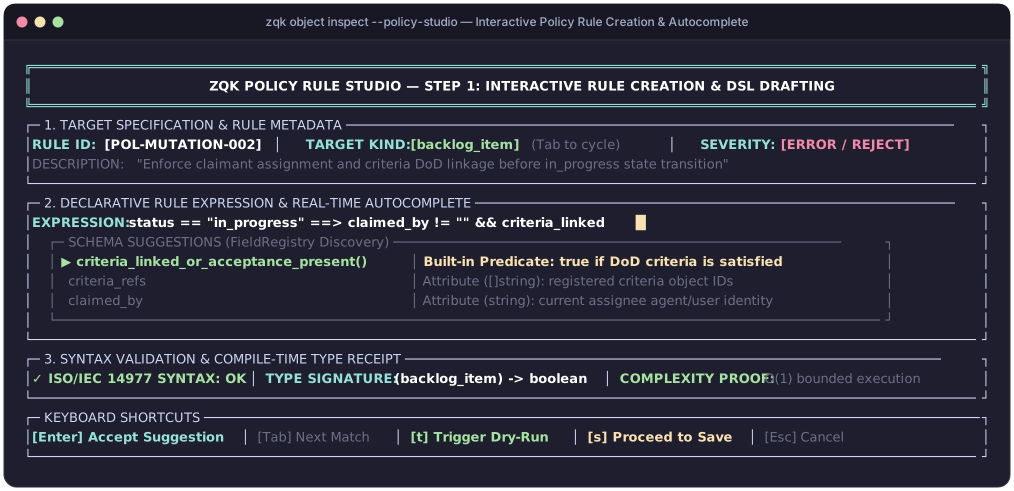
Operators launch the creation modal via `zqk object inspect --policy-studio` or by pressing p from within the Object Inspector scoreboard.
#### Visual Terminal Screenshot: Interactive Rule Creation & Autocomplete
#### Datapoint Breakdown & Operator Guidance
| Datapoint / Component | Visual Format | Semantic Meaning | Why It Is Useful & Operational Purpose |
| :--- | :--- | :--- | :--- |
| **Rule ID Field** | Cyan tag (`[POL-MUTATION-002]`) | Unique policy identifier | Canonical object ID under which the policy rule is indexed in `.zqk/process/policy/`. |
| **Target Kind Selector** | Green badge (`[backlog_item]`) | Schema kind evaluated by this rule | Binds DSL field autocompletion to the exact attribute definitions of this kind. Press Tab to cycle. |
| **Severity Tier** | Red badge (`[ERROR / REJECT]`) | Enforcement severity classification | Dictates check-valve behavior: `ERROR` rejects non-compliant mutations; `WARN` logs audit telemetry without blocking. |
| **Expression Prompt** | Cyan prompt with yellow cursor (`█`) | Active editing prompt for Validation DSL | Real-time declarative boolean invariant (e.g. `status == "in_progress" ==> claimed_by != "" && criteria_linked`). |
| **Autocomplete Popup** | Floating bordered menu with active row (`▶`) | Schema-driven token suggestions | Dynamically introspects `FieldRegistry` to suggest attributes, predicates, and enums as the operator types. |
| **Predicate Annotations** | Dim helper text with return types | Inline documentation for selected token | Explains semantics and type signature (e.g. `criteria_linked_or_acceptance_present() -> boolean`). |
| **Syntax & Type Receipt** | Green status check (`✓ SYNTAX: OK`) | Compile-time static type receipt | Confirms ISO/IEC 14977 grammar compliance and `O(1)` bounded termination proof before execution. |
| **Action Hotkeys** | Keycap menu (`[Enter] Accept`, `[t] Dry-Run`, `[s] Save`) | Available keyboard accelerator bindings | Enables rapid, seamless keyboard-only DSL composition without switching to an external editor. |
---
### 5.3 Stage 2: Live Population Dry-Run Evaluation Matrix
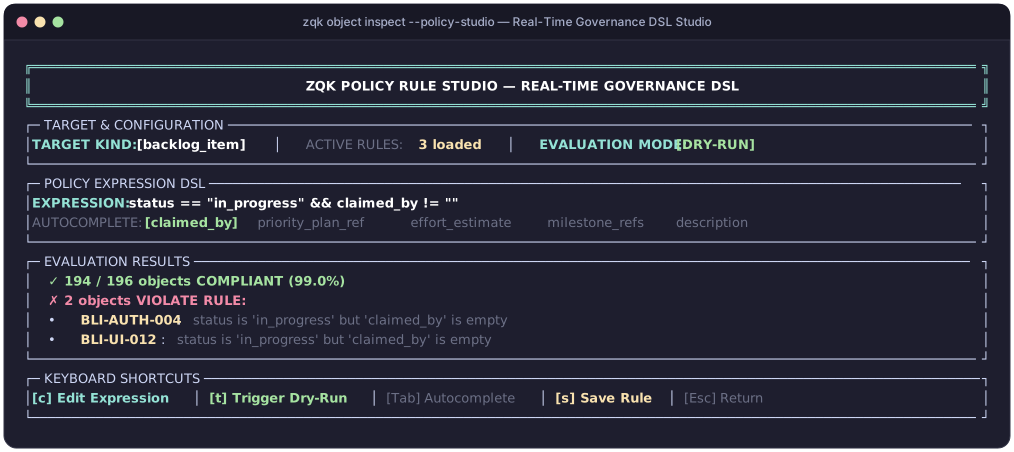
Pressing t triggers an instant, zero-cost dry-run evaluation across all repository entities matching the target kind.
#### Visual Terminal Screenshot: Dry-Run Evaluation Matrix
#### Datapoint Breakdown & Operator Guidance
| Datapoint / Component | Visual Format | Semantic Meaning | Why It Is Useful & Operational Purpose |
| :--- | :--- | :--- | :--- |
| **Header Banner** | Double-line cyan box (`╔...╗`) | Subsystem banner and console context | Confirms active governance and DSL editing environment. |
| **Active Rule Counter** | Yellow count pill (`3 loaded`) | Active rules registered for this kind | Indicates existing governance coverage for the target kind. |
| **Evaluation Mode** | Green badge (`[DRY-RUN]`) | In-memory execution safety plane | Confirms evaluations execute in memory across CAS live projections without mutating disk state. |
| **Expression DSL** | Formatted string with highlighted tokens | Active boolean predicate condition | Declarative governance invariant under evaluation across the repository. |
| **Compliance Scoreboard** | Green summary metric (`194 / 196 (99.0%)`) | Real-time population compliance rate | Immediate visual proof of policy impact across the entire repository. |
| **Violation Triage** | Red bulleted list (`✗ 2 objects VIOLATE`) | Specific entity IDs and failure explanations | Identifies non-compliant entities (e.g. `BLI-AUTH-004`, `BLI-UI-012`) requiring operator remediation. |
| **Failure Diagnostics** | Dim contextual failure reason | Missing attribute or invariant mismatch | Pinpoints exact causes (e.g. `status is 'in_progress' but 'claimed_by' is empty`). |
| **Action Hotkeys** | Keycap menu (`[c] Edit`, `[t] Dry-Run`, `[s] Save`) | Interactive studio control commands | Enables rapid test-driven policy iteration and promotion. |
---
### 5.4 Stage 3: Atomic Policy Save, CAS Promotion & Gate Enforcement
Once the operator confirms that the dry-run results are sound, pressing s brings up the **Save & Promotion Confirmation Dialog**. Saving commits the policy to CAS storage and binds it to the system check-valves.
#### Visual Terminal Screenshot: Save & Atomic CAS Promotion Receipt
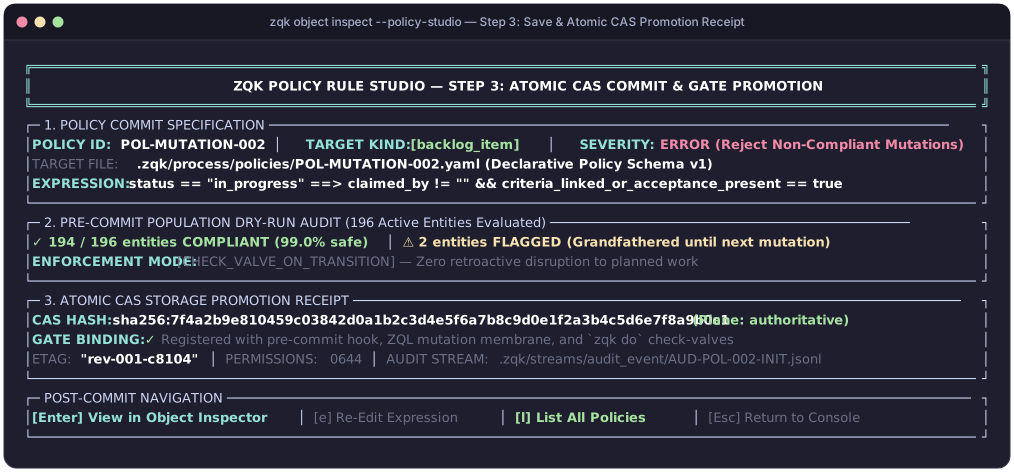
#### Datapoint Breakdown & Operator Guidance
| Datapoint / Component | Visual Format | Semantic Meaning | Why It Is Useful & Operational Purpose |
| :--- | :--- | :--- | :--- |
| **Policy Specification** | Structured metadata panel | Canonical rule ID, kind, and severity | Final audit confirmation of the policy's operational parameters before disk serialization. |
| **Target Storage Path** | File path (`.zqk/process/policy/*.yaml`) | File-plane destination path | Verifies that the rule adheres to the canonical Declarative Policy Schema v1 layout. |
| **Pre-Commit Audit Receipt** | Green metric with grandfathering pill | Population safety certification | Confirms enforcement mode: existing non-compliant items are grandfathered until their next state transition. |
| **CAS Content Hash** | Hex SHA-256 digest (`sha256:7f4a2b9...`) | Cryptographic content-addressed hash | Guarantees tamper-evident immutability and CAS provenance in the authoritative storage plane. |
| **Gate Binding Status** | Green checkmark with hook details | Active enforcement hooks | Confirms immediate registration with git pre-commit hooks, ZQL mutation membranes, and `zqk do` check-valves. |
| **Audit Log Reference** | Path to audit event (`AUD-POL-002-INIT`) | Traceable audit trail object | Records who authored the policy, timestamp, and evaluation receipt into the append-only audit stream. |
| **Post-Commit Hotkeys** | Keycap menu (`[Enter] Inspect`, `[l] List All`) | Post-save navigation accelerators | Allows immediate inspection of the minted policy node in the Object Inspector or return to the main console. |
---
### 5.5 Autocompletion Engine, Standard Library & Complexity Guarantees
The autocompletion engine inspects `objects.GetGlobalFieldRegistry()` dynamically:
- **Field Name Discovery**: Introspects registered attributes for the target kind (e.g., `status`, `priority_tier`, `claimed_by`).
- **Enum Value Suggestions**:
- `status` suggests `["draft", "planned", "in_progress", "complete", "blocked"]`.
- `priority_tier` suggests `["P0", "P1", "P2", "P3"]`.
- **Operator Selection**: Suggests valid comparison and membership operators (`==`, `!=`, `>`, `<`, `in`, `matches_regex`, `all_satisfied`).
- **Standard Predicate Library**: Exposes built-in pure functions:
- `criteria_linked_or_acceptance_present()`: Confirms at least one DoD criteria node is bound.
- `tests_ok_per_customization()`: Validates that all associated test cases pass.
- `security_gate_ok_or_na()`: Evaluates required security credentials and role scopes.
- **Purity & Termination Guarantees**: All expressions are restricted to ISO/IEC 14977 non-looping, side-effect-free predicates, guaranteeing deterministic `O(1)` evaluation complexity per object.
---
## 6. Dual Human & Machine-Readable Interfaces
### 6.1 Human Interface (Interactive TUI)
Interactive full-screen ANSI TUI rendering powered by the ZQK Terminal Design System (`tds.Panel`, `tds.NewTable`, and `tds.StatRow`), with color-coded status badges, real-time keyboard navigation, and responsive master-detail layouts.
### 6.2 Agent / Machine Interface (`--format json`)
Autonomous agents calling `./bin/zqk object inspect [id] -f json` receive a streamlined, high-signal projection:
```json
{
"kind": "backlog_item",
"id": "BLI-001",
"status": "in_progress",
"priority": "P0",
"title": "Implement TUI 7-Tab View",
"claimed_by": "PER-DEFAULT-OPERATOR",
"lineage": {
"goal": "GOAL-001",
"requirement": "REQ-012",
"test_cases": ["TST-030-01"],
"is_intact": true
},
"criteria_summary": {
"total": 3,
"satisfied": 3,
"pending": 0
},
"actions_available": [
"transition_status",
"unclaim",
"edit_properties"
]
}
```
---
## 7. Implementation Components
The Object Inspector and Policy Studio architecture is structured into eight core modules:
### 7.1 CLI Core & Dual Semantic Agent Projection
- **Handler**: `cmd/zqk/object/inspect.go`.
- **Capabilities**: Argument and flag validation (`--fields`, `--sort-by`, `--group-by`, `--filter`).
- **Machine Interface**: Streamlined, high-signal semantic JSON projection (`-f json`) for autonomous agents.
### 7.2 TUI Shell, Dynamic Field Registry & Drill-Down Navigation
- **Shell**: Interactive master-detail terminal application.
- **Schema Auto-Discovery**: Driven dynamically by `FieldRegistry`.
- **Ergonomics**: Quick-filter bar (f), inline search (/), and sort cycling (s).
### 7.3 Universal Message Line & View Continuity
- **Notification Pipeline**: Universal Line 6 dynamic message notification pipeline across all views.
- **Continuity Guarantees**: Prevents header disappearance, buffer clearing, and layout jitter during view transitions.
### 7.4 Modular Display Cards & Role-Gated Action Palette
- **Display Modules**: Standardized Lineage & Traceability Radar, CAS Storage Profile, and Ontology Card.
- **Action Palette**: Interactive action dialog (Enter) gated by active caller role and permissions.
### 7.5 Unified QA Tab & Test Dashboard Integration
- **Test Integration**: Integrated QA verification view.
- **Visual Harmonization**: Matches console styling and key bindings across all views with interactive test inspection.
### 7.6 Policy Rule Studio & Field DSL Autocompleter
- **Visual Studio**: Interactive validation DSL editor launched via `--policy-studio`.
- **Autocompleter**: Real-time attribute token discovery from `objects.GetGlobalFieldRegistry()`.
- **Dry-Run Engine**: Evaluates rule invariants in memory against active kernel objects before saving.
### 7.7 End-to-End Verification Suite
- **Test Coverage**: Automated test suites in `cmd/zqk/object/inspect_test.go`.
- **Scenarios**: Verified keyboard navigation, filter cycling, sorting, JSON serialization, and error recovery.
### 7.8 User Documentation & Interactive Tutorials
- **Operator Guides**: Reference manual in `docs/manual/OBJECT_INSPECTOR_AND_POLICY_STUDIO.md`.
- **Interactive Walkthroughs**: Step-by-step tutorial in `docs/tutorials/INTERACTIVE_OBJECT_INSPECTION_TUTORIAL.md`.